Excel Files From Web Dont Open: Difference between revisions
Jump to navigation
Jump to search
| Line 7: | Line 7: | ||
=Resultion= | =Resultion= | ||
The resolution is to Unblock files before opening them. | |||
# Download the file | # Download the file | ||
# Open the file location if necessary <BR> [[File:OpenFolder.png | 600px]] | # Open the file location if necessary <BR> [[File:OpenFolder.png | 600px]] | ||
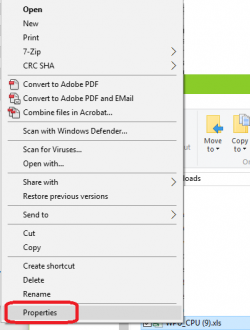
# Right click the file > Properties <BR> [[File:ViewFileProperties.png | 250px]] | # Right click the file > Properties <BR> [[File:ViewFileProperties.png | 250px]] | ||
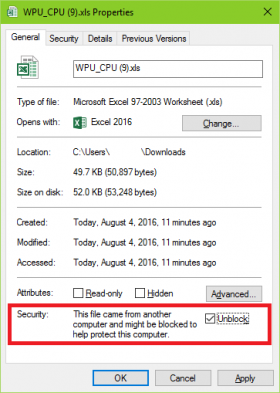
# Unblock the file <BR> [[File:UnblockFile.png | 280px]] | # Unblock the file <BR> [[File:UnblockFile.png | 280px]] | ||
Revision as of 14:26, 4 August 2016
Issue
Excel Files from the internet do not open successfully, and instead a blank Excel window appears such as the one below:

Cause
A Microsoft security update released in July 2016 prevents certain file types downloaded from the internet from opening.
Resultion
The resolution is to Unblock files before opening them.
- Download the file
- Open the file location if necessary

- Right click the file > Properties
- Unblock the file