Windows 7: Difference between revisions
Jump to navigation
Jump to search
No edit summary |
No edit summary |
||
| Line 18: | Line 18: | ||
<li>You should now be connected to WP Wireless. Please contact [https://help.wpunj.edu/helpdesk/ Help Desk Request] if you are unable to connect. | <li>You should now be connected to WP Wireless. Please contact [https://help.wpunj.edu/helpdesk/ Help Desk Request] if you are unable to connect. | ||
</ol> | </ol> | ||
[[:Category:Network Services|Network Services]] | [[:Category:Network Services|Network Services]] | ||
Revision as of 12:50, 13 December 2012
- Select WP Wireless
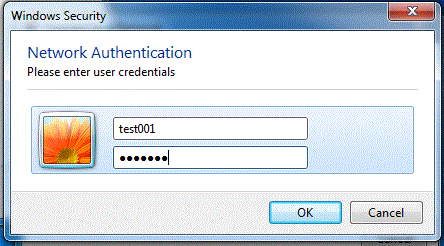
- Enter your WP Connect Username and Password
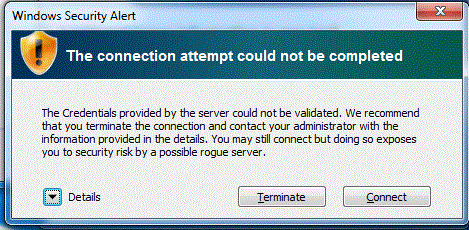
- Click Connect when presented with the Security Warning
- You may have to enter your Username and Password again
- You should now be connected to WP Wireless. Please contact Help Desk Request if you are unable to connect.

